

Frequently asked Questions
ticura curated feed
Why can’t I download the ticura curated feed using the example curl command?
Using the example curl command may fail for several reasons. In most cases it is just an outdated curl version or on outdated CA certificate bundle. Please ensure you have a curl version 7.52.* (2016-12-21) and newer.
Hint: on older versions it may help to use the --insecure parameter to workaround the issue. Running the curl command in verbose mode using -v helps to get more information related to the connection.
Can I handle false positives or false negatives with the ticura solution?
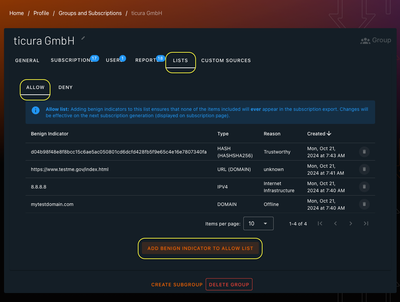
Yes, it's possible. ticura's group lists can deny/allow IOCs at the group level. You have a unique and central place to manage all your IOCs completely independent of used products/export formats. Your changes affect all exported ticura-curated threat intelligence feeds within the managed group.
- Allow list: Benign indicators will never appear in exports for subscriptions within the group.
- Deny list: IOCs will be part of every export for subscriptions within the group.
Managing Allow / Deny lists - Step by Step:
- login an open your Profile -> Groups and Subscriptions
- choose the group containing your subscriptions
- navigate to tab "LISTS"
- Choose Allow or Deny list
- Add your entry by clicking the "ADD ..." button
Note: Allow/Deny list entries and modifications become active on the next subscription export. You can find out when that will happen next on the SUBSCRIPTIONS tab.
When managing several groups, consider that Allow / Deny lists are applied per group. There is no inheritance or other logic in place yet.
Is it possible to edit existing subscriptions?
Yes it is. You can edit existing subscriptions if you have permissions to do that. More information can be found at our Getting Started guide.
IOC Types
What IOC Types are available?
| Type | Description |
|---|
Enrichments
What enrichments are available?
| Type | Description |
|---|
Filters
What filters are available?
| Type | Description |
|---|
Output Formats
What output formats are available?
| Type | Description |
|---|
ticura Enricher API
Why does Enricher API show no results while the UI search shows IOC related data?
Our Search Portal provides a Global CTI View using all potential IOC sources, including those that require licenses (preview). This allows users to see which data sources are available for integration.
Our Enricher API only delivers results from sources that your account is already licensed or entitled to. If a particular source requires an additional license and this is not active for your account, the API will return no data for that source.
In short:
- The UI shows all available sources (including teaser for paid or restricted ones).
- The API only shows data you're licensed to access.
This setup helps to discover ticuras capabilities while ensuring compliance with licensing agreements.
ticura Darkweb & Breach Monitoring
Why am I not getting any results when searching for an asset on the dark web?
Only items added to the asset list are eligible for searching on the dark web. If you search for an asset that is not on the list, you will not get any results. Please make sure to add the asset to the list first and then search for it. In the asset list view there's a shortcut in the actions column of the item row where you can easily trigger a live search for that item with darkweb results included. When adding a new item to the list, selecting a provider is mandatory. By default, active monitoring is disabled. You have to actively enable it, as there might be incoming costs depending on your contract.
How do I add an asset to that list?
To add an asset to the dark web monitoring list, navigate to the list view and navigate to the ASSETS tab. Click on the ADD ASSET to ASSETS LIST button and fill in the required information. You can also specify which providers should be used for monitoring.